Comment vérifier si votre domaine utilise Cloudflare dans cPanel
Cet article a été traduit automatiquement.
Vous pouvez vérifier l'état de votre Cloudflare dans cPanel.
1. Connectez-vous à votre compte cPanel.
2. Dans la section Logiciel, cliquez sur Cloudflare.

3. Cliquez sur Se connecter ici pour accéder à votre compte Cloudflare.

4. Cliquez sur Domaine dans le menu.

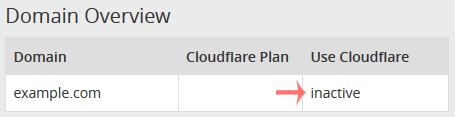
5. Sous Utiliser Cloudflare, si votre domaine l'utilise, l'état doit être Actif. S'il est inactif, cela signifie que votre domaine n'utilise pas Cloudflare.
Cet article a-t-il été utile ?
Discussion
Chargement de la discussion…
Connectez-vous pour rejoindre la discussion.